

How do I change the settings on an electric fireplace with mantel?
Nov 04, 2025
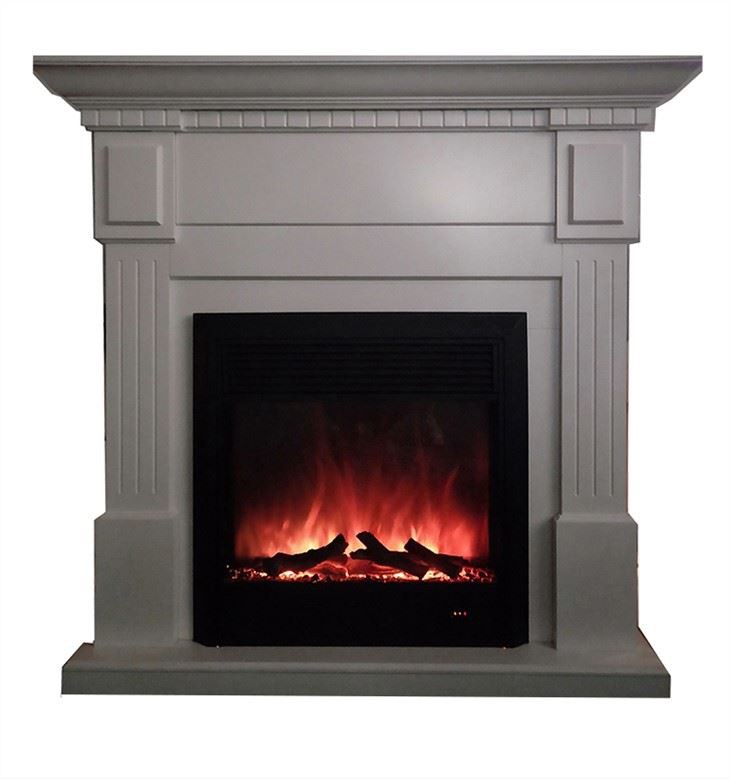
Hey there! As a supplier of Electric Fireplace with Mantel, I've had my fair share of customers asking about how to change the settings on these nifty devices. So, I thought I'd put together this blog post to walk you through the process. Whether you've just bought one of our Freestanding Electric Fireplace Mantel or Freestanding Electric Fireplace and Mantel, this guide should come in handy.
Getting to Know Your Electric Fireplace with Mantel
First things first, let's take a quick look at what you're dealing with. Our electric fireplaces with mantels are designed to be user - friendly, but there are a few components you should be familiar with.
The Control Panel
Most of our models come with a control panel either on the side of the fireplace, the front, or sometimes even a remote control. The control panel is where you'll make all your setting changes. It usually has buttons for things like power, heat, flame brightness, and sometimes additional features like timer and sound effects.
The Display
Many of our electric fireplaces have a digital display. This display shows you important information like the current temperature setting, the flame brightness level, and the remaining time if you've set a timer.
Changing the Flame Settings
One of the coolest features of our electric fireplaces is the realistic flame effect. You can customize it to suit your mood and the ambiance you want to create.
Flame Brightness
To change the flame brightness, look for a button labeled something like "Flame Bright" or "Brightness" on your control panel or remote. Press this button to cycle through different brightness levels. You might have options like low, medium, and high, or even a continuous adjustment where you can fine - tune the brightness to your exact preference.
Flame Speed
Some of our models also allow you to adjust the speed of the flames. A faster flame speed gives a more dynamic and lively look, while a slower speed creates a more serene and peaceful atmosphere. Look for a button marked "Flame Speed" or "Speed" and press it to cycle through different speed settings.
Adjusting the Heat Settings
The heat function is another important aspect of your electric fireplace. You can use it to warm up a room during the colder months.
Temperature Setting
To set the temperature, find the "Heat" or "Temp" button on your control panel. Press this button and then use the up and down arrows to select your desired temperature. Our fireplaces usually have a range of temperatures you can choose from, typically starting from around 60°F to 85°F.
Heat Output
You might also have the option to adjust the heat output. This is useful if you only want a little bit of warmth or if you need to heat a larger room. Look for a button like "Heat Output" or "Power" and press it to cycle through different heat levels. For example, you might have a low - heat setting for a small area and a high - heat setting for a bigger space.
Setting the Timer
If you don't want to leave the fireplace on all night or you want it to turn on at a specific time, the timer function is really handy.
Setting the On/Off Time
To set the timer, look for a "Timer" button on your control panel or remote. Press it, and then use the up and down arrows to set the number of hours you want the fireplace to run. You can usually set it for anywhere from 1 to 12 hours. Once you've set the time, press the "Set" or "Enter" button to confirm.
Additional Features
Some of our electric fireplaces come with extra features that you can customize.
Sound Effects
Some models have sound effects that mimic the crackling of a real fire. To turn the sound on or off, look for a "Sound" or "Crackle" button on your control panel. You might also be able to adjust the volume of the sound using the volume buttons.
Color Changing Flames
A few of our high - end models have color - changing flames. You can select different colors like blue, green, purple, or even a multi - color mode. Look for a "Color" or "Flame Color" button on your control panel to cycle through the available colors.
Troubleshooting Setting Changes
Sometimes, you might run into issues when trying to change the settings. Here are a few common problems and how to fix them.
Unresponsive Buttons
If a button on your control panel or remote isn't working, first check the batteries in the remote (if you're using one). If the batteries are fine, try resetting the fireplace. You can usually do this by unplugging it from the power source for a few minutes and then plugging it back in.
Incorrect Display Readings
If the display on your fireplace is showing incorrect information, it could be a software glitch. Try resetting the fireplace as described above. If the problem persists, contact our customer support team, and we'll be happy to assist you.
Conclusion
Changing the settings on your electric fireplace with mantel is pretty straightforward once you know what you're doing. Our goal as a supplier is to make sure you have a great experience with our products. Whether you're looking to create a cozy atmosphere with the perfect flame settings or warm up a room with the right heat level, our electric fireplaces give you a lot of flexibility.
If you're interested in purchasing one of our Freestanding Electric Fireplace Mantel or Freestanding Electric Fireplace and Mantel, or if you have any further questions about setting changes or our products in general, don't hesitate to reach out. We're here to help you make the most of your electric fireplace.
References
- Manufacturer's User Manuals for Electric Fireplaces with Mantel
- In - house product knowledge and testing results